ReXGuardian – Remote Connectivity Assistant

A remote-access expert on every device—no tickets required.

Self-healing autonomous remediation for Windows 11—combining ML-driven anomaly detection with policy-gated automated fixes in a fully on-device detect › decide › act loop. No data leaves the endpoint.
Local-Only Secure AINo Remote AI API CallsCoPilot+ PCs (NPU)Zero Data Egress
ReXGuardian product logo — enterprise remote-access connectivity assistant with on-device AI for VPN, ZTNA, and VDI self-healing
Built for Enterprise Remote-Access Connectivity Stacks
Windows 11Splunk (SIEM)ServiceNowTeams / SlackIntune / SCCMMicrosoft Phi Silica (SLM)
On-Device Intelligence

Zero-wait help desk—on your laptop.

ReXGuardianCA installs an AI specialist on each endpoint. It learns that device’s VPN, ZTNA & VDI nuances, detects drift, and fixes issues before users even notice. When escalation’s needed, it hands human-readable notes to ServiceNow.
MTTR
Hours → seconds
~60%
L1 ticket reduction
93%
Tickets auto-avoided (pilot)
Comparison diagram showing traditional help desk ticket workflow taking hours versus ReXGuardianCA on-device AI self-healing completing VPN ZTNA VDI remediation in under 5 seconds with 93 percent tickets auto-avoided and 60 percent L1 ticket reduction
Help Desk Ticket vs <5 second Self-Healing Remediations
Process

How it works

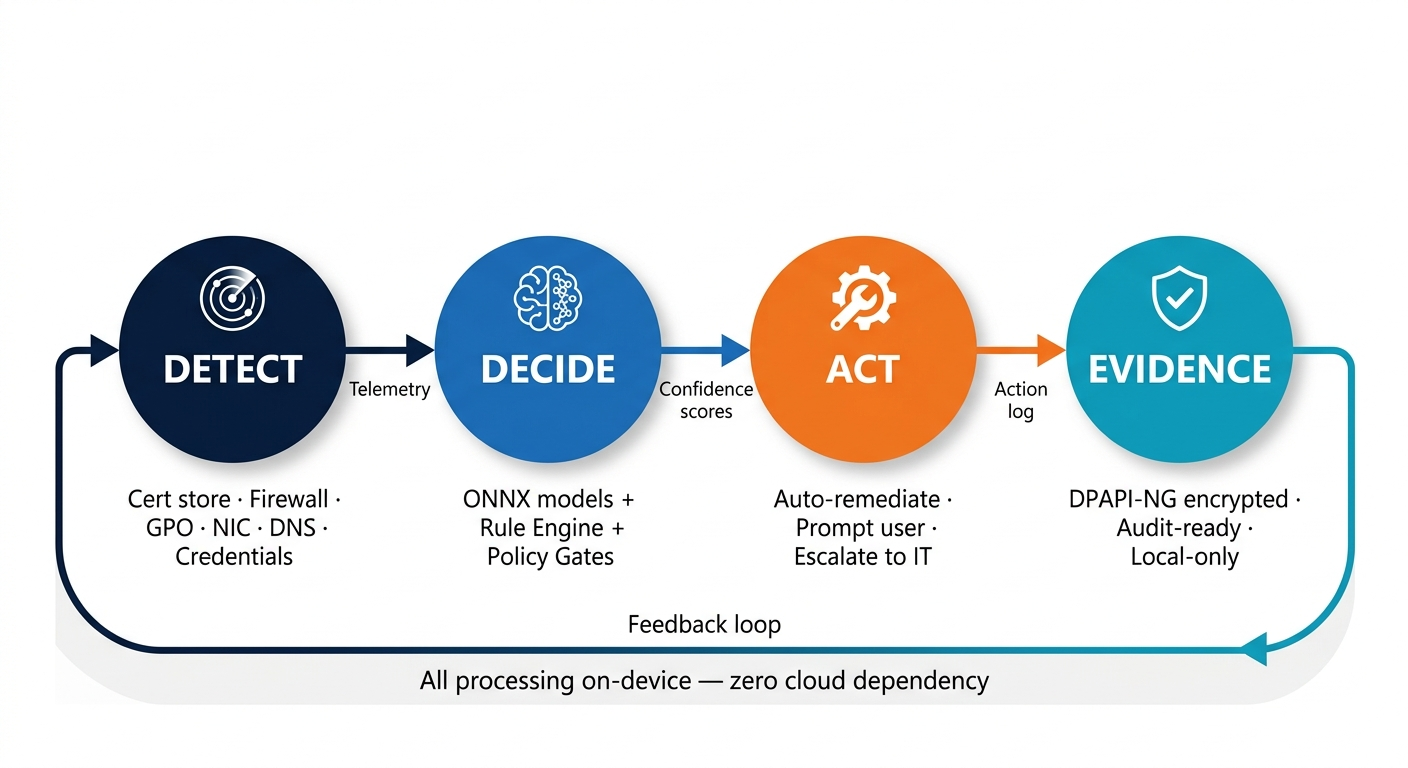
Detect → Decide (ONNX + Rule Engine + Policy Gates) → Act (Self-Heal) → Evidence (local, encrypted)
1
Detect
Watches critical connectivity layers including: cert store, firewall, GPO, NIC, credential vault.
2
Diagnose
Translates low-level errors into clear explanations; forecasts failure windows using AI ONNX/Phi Silica.
3
Self-Heal
Policy-controlled playbooks restart services, refresh credentials, repair remote access connectivity profiles, reset adapters.
4
Evidence
Audit-ready logs stored locally; no SaaS or log-shipping required.
ReXGuardianCA self-healing loop diagram — Detect (cert store, firewall, GPO, NIC, DNS, credentials), Decide (ONNX models plus rule engine plus policy gates), Act (auto-remediate, prompt user, or escalate), Evidence (DPAPI-NG encrypted audit-ready local logs) with feedback loop — all on-device, zero cloud dependency
Why ReXGuardianCA

Purpose-built for remote connectivity resilience
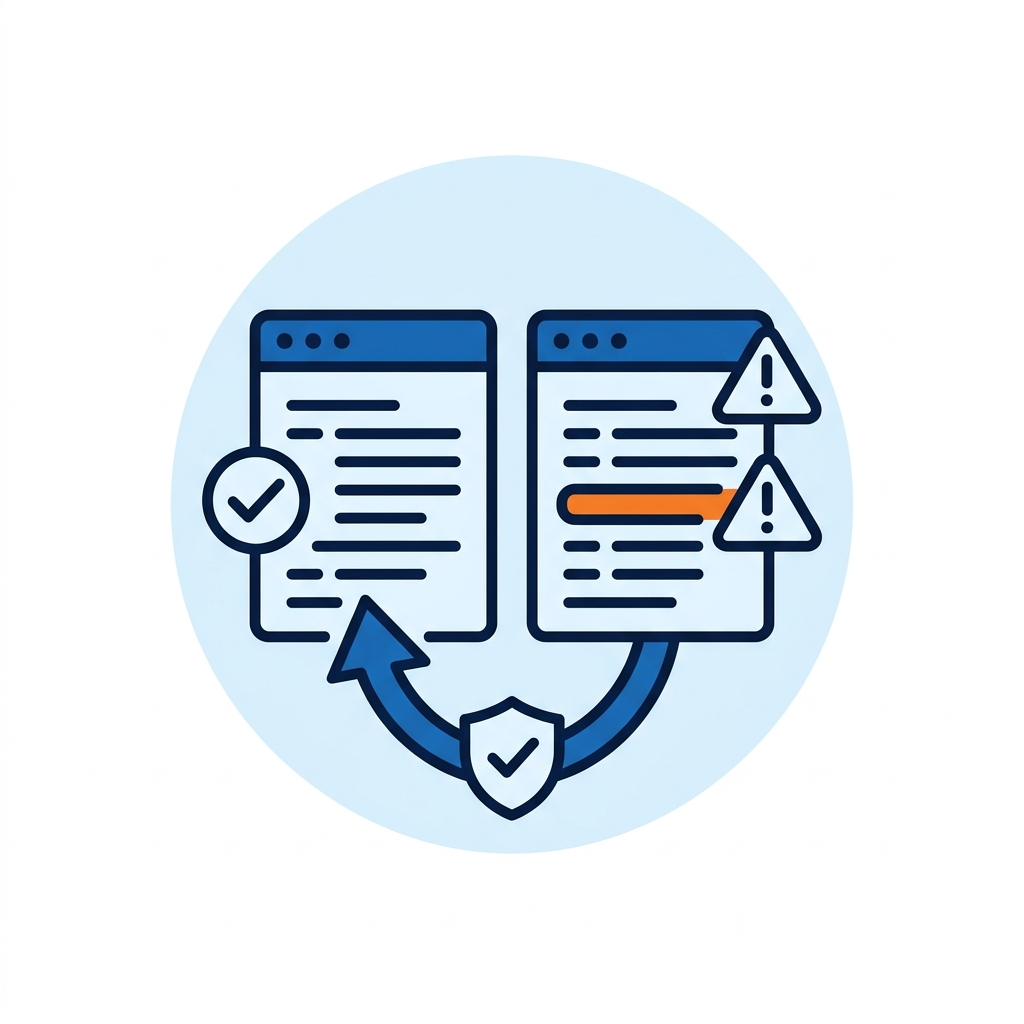
ReXGuardianCA self-healing drift shield icon — Siamese Neural Network comparing configuration baseline against current state to detect drift in expired certificates, GPO changes, and firewall mutations with automatic policy-gated rollback
Self-Healing Drift Shield
Remote-access clients silently drift (expired certs, GPOs, client firewall changes, NIC driver revs, etc.). ReX’Ai spots configuration drift in real time, rolls back, and logs evidence—locally.
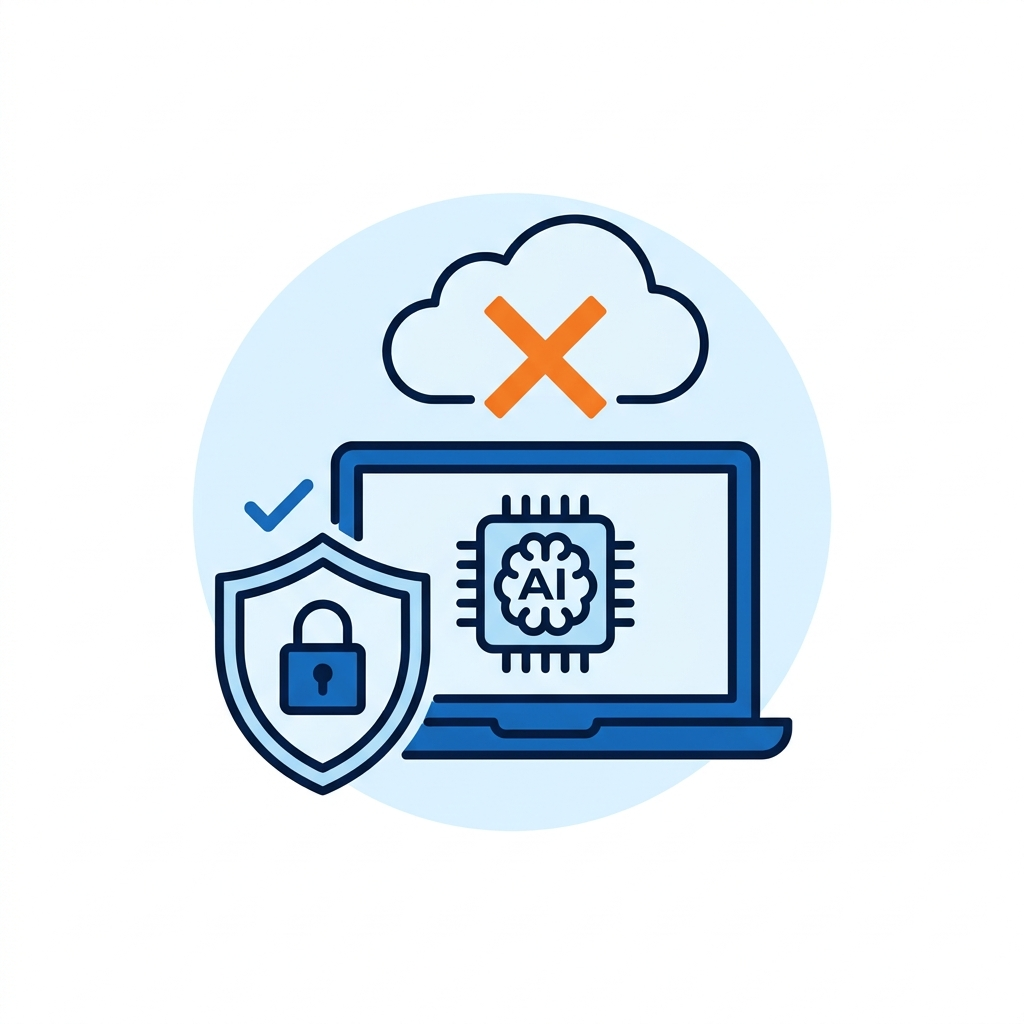
ReXGuardianCA compliance-grade privacy icon — 100 percent local AI inference with no cloud dependency, DPAPI-NG encryption, zero data egress, SOC 2 HIPAA GDPR compliance
Compliance-Grade Privacy, Consumer-Grade Ease
100% local inference; no SaaS. “Fix Now” that just works. SOC 2 & HIPAA mapping available.
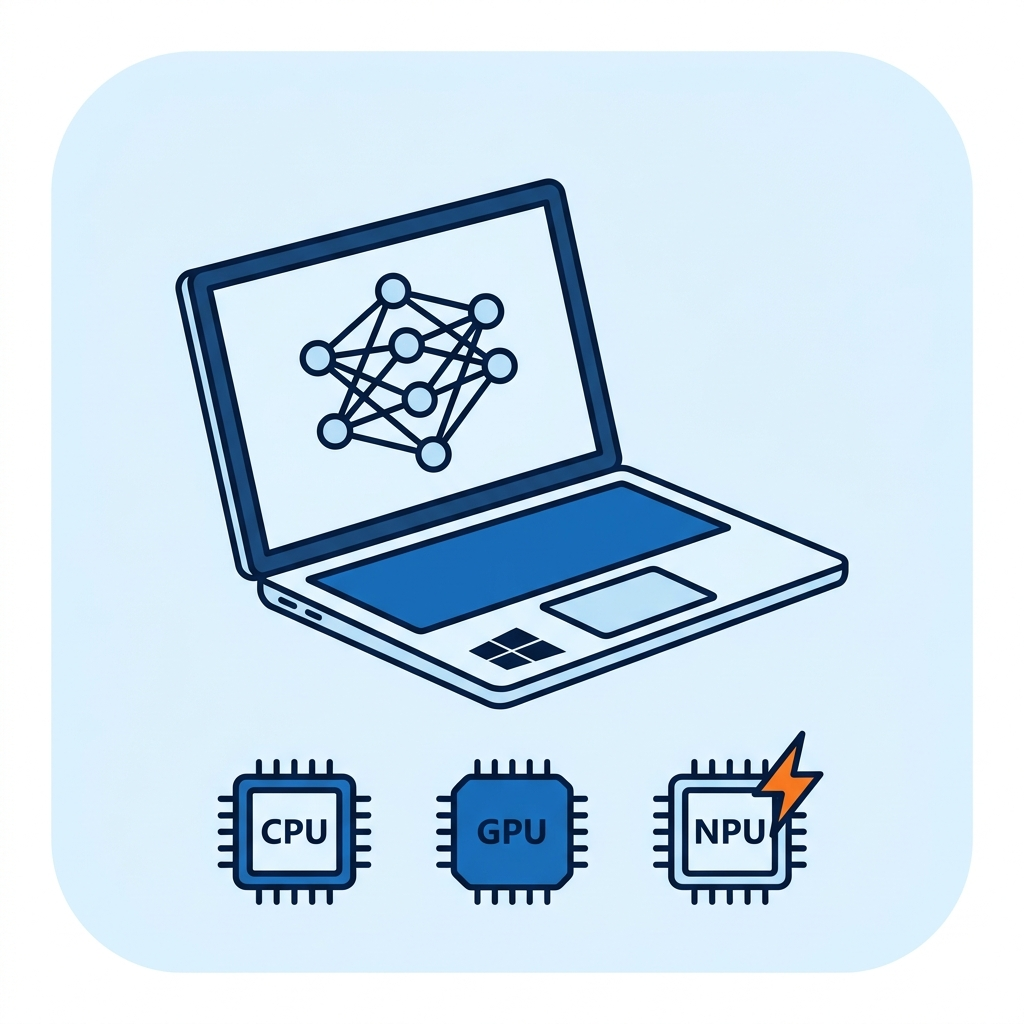
ReXGuardianCA NPU-ready icon — Windows 11 CoPilot Plus PC with hardware-agnostic CPU GPU NPU acceleration via ONNX Runtime and DirectML for sub-second ML inference
Runway-Ready for the PC NPU Era
Designed for today’s CPUs; lights up Windows 11 CoPilot+ PC NPUs when present—sub-second ML client-only inference.
On-Device AI/ML Architecture

Multiple custom-trained ML model families. Fully on-device. Zero cloud dependency.
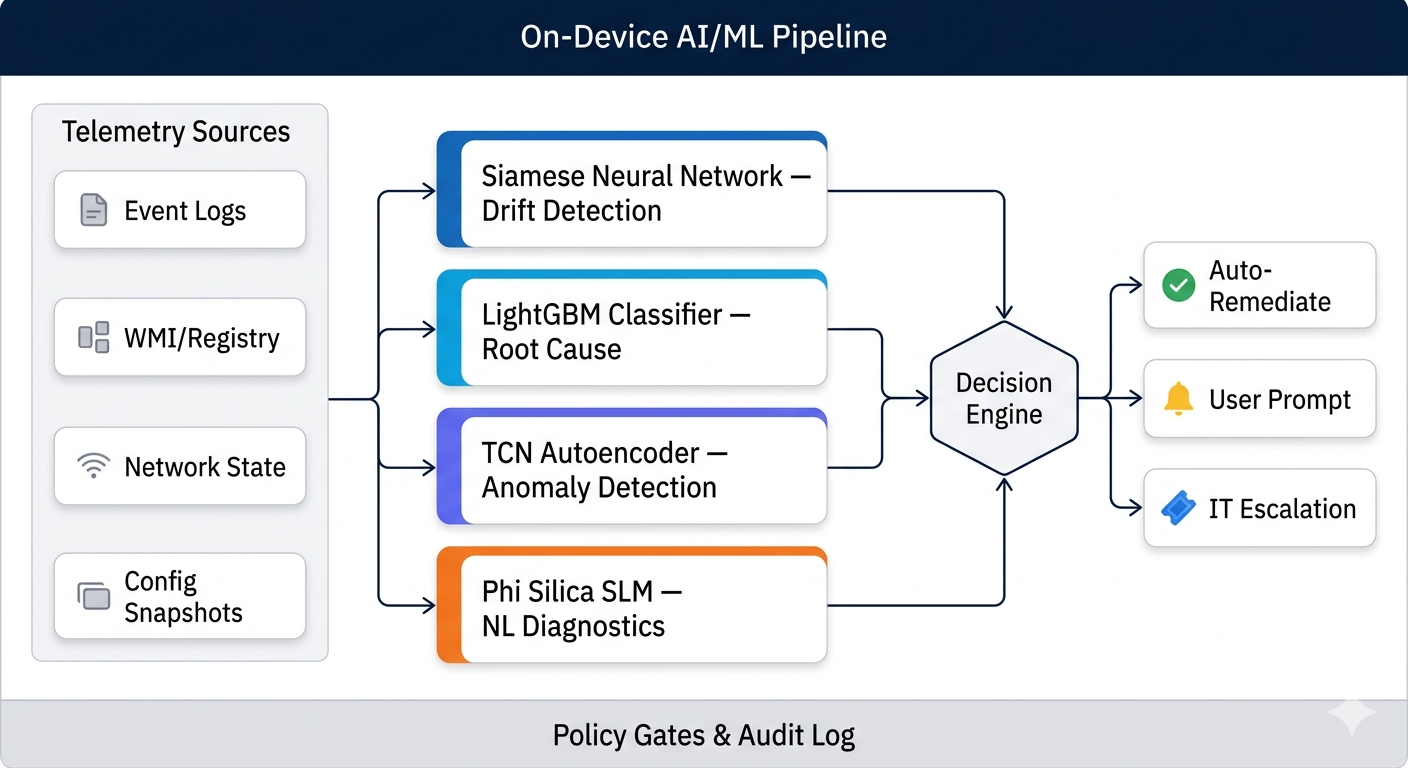
ReXGuardianCA deploys four purpose-built ML model families directly on the endpoint, each optimized for a distinct stage of the self-healing pipeline.
Drift Detector
Siamese Neural Network
Contrastive-learning network continuously compares live VPN/ZTNA/VDI configuration snapshots against a cryptographically signed baseline. Flags the exact parameter that drifted—expired certificates, GPO misfires, NIC driver revisions, client firewall mutations—and triggers policy-gated rollback with full audit evidence.
Health-Score Classifier
LightGBM (Gradient Boosted Trees)
Multi-class gradient-boosted model ingests telemetry features at failure time—error codes, encoded log messages, network-reachability state, DNS status, certificate validity—and predicts the root-cause category. High-confidence classifications feed the remediation engine; low-confidence predictions escalate with human-readable diagnostics.
Time-Series Anomaly Detector
TCN Autoencoder
Temporal Convolutional Network autoencoder monitors historical performance streams—connection uptime, reconnect frequency, latency trends, packet-loss trajectories—to surface subtle degradation patterns preceding outages. Issues predictive failure alerts or proactively triggers reconnects before user impact.
NL Diagnostic Engine
Microsoft Phi Silica (SLM, ~3.3B params)
Locally hosted small language model translates cryptic event-log entries into plain-English explanations, generates contextualized remediation scripts, and produces human-readable escalation notes for ServiceNow or ITSM handoff. Runs entirely via the Windows AI runtime—no external API calls.
⚙️ Decision Engine & Policy Gates
A rule-based arbitration layer fuses outputs from all four model families, weighs each model’s confidence score against admin-defined policy thresholds, and selects the action: auto-remediate, prompt for user confirmation, or escalate. Every action is logged with rollback capability. Deterministic rule packs handle the top 80% of known failure patterns in milliseconds; ML models extend coverage to combinatorial edge-cases that elude static signatures.
ReXGuardianCA on-device AI/ML pipeline architecture — telemetry sources feeding four ML model families (Siamese Neural Network drift detection, LightGBM root-cause classification, TCN autoencoder anomaly detection, Phi Silica SLM natural-language diagnostics) into Decision Engine with policy gates, producing auto-remediation, user prompts, or IT escalation — all on-device, zero cloud dependency
Modular Self-Healing Subscription Packs

Remediation definition packs (.rxdef) combine ML findings with policy-driven fix scripts.
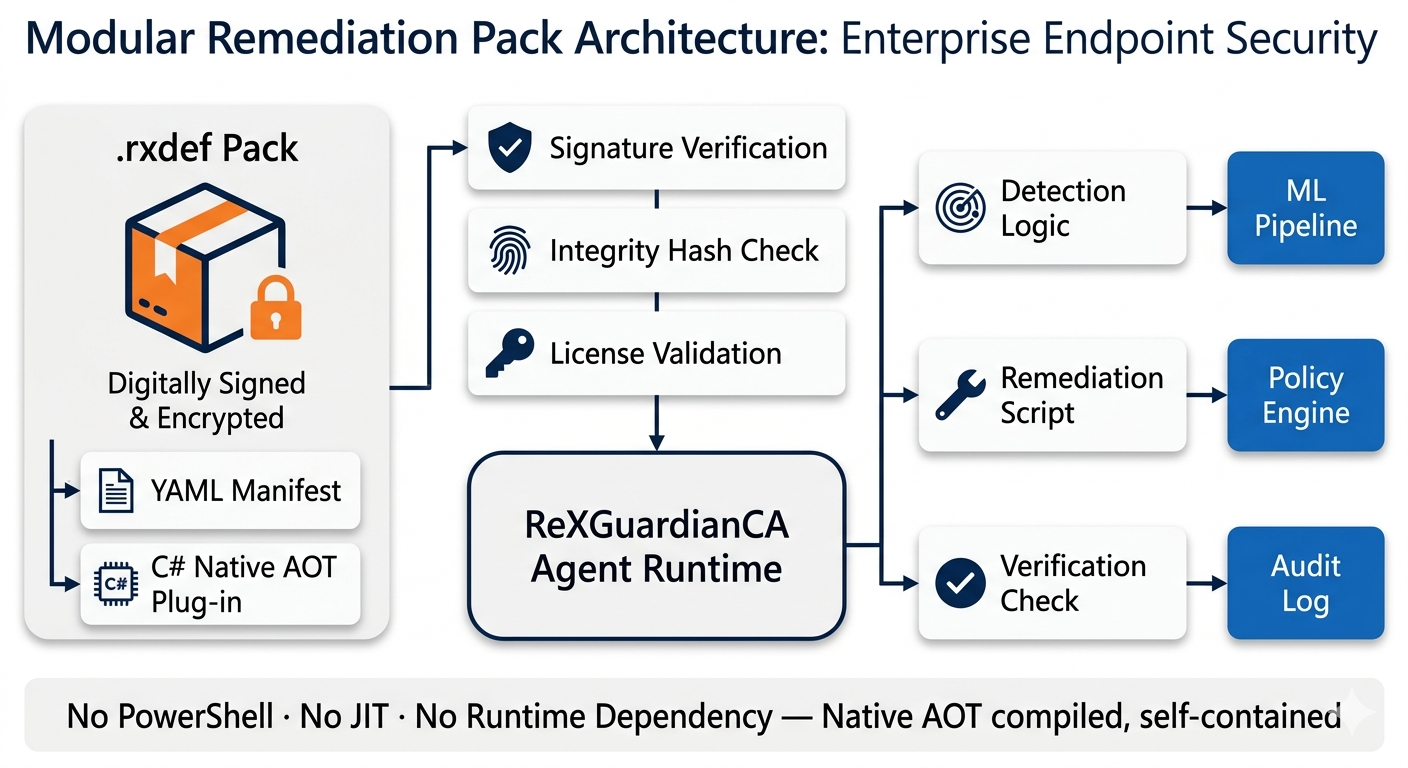
Delivered as secure, signed, Native AOT-compiled modules—no PowerShell scripts, no JIT overhead, no runtime dependency.
ReXGuardianCA separates remediation intelligence from the core agent through modular definition packs (.rxdef files). Each pack contains a YAML manifest (versioned metadata, licensing flags, detection criteria) and a native AOT-compiled remediation plug-in.
ReXGuardianCA rxdef remediation definition pack architecture — digitally signed encrypted pack containing YAML manifest and C# Native AOT plug-in passing through signature verification, integrity hash check, and license validation before loading into agent runtime, routing to ML pipeline, policy engine, and audit log — no PowerShell, no JIT, Native AOT compiled
🔐
Signed & Encrypted
Cryptographic integrity verified before loading. Model supply-chain integrity enforced.
🔄
Ship Without Updates
New packs deploy without application rebuilds. Automatic rollback if revoked or superseded.
ML → Policy → Fix
ML pipeline identifies pattern, Decision Engine matches .rxdef pack, compiled plug-in executes fix—all on-device, all policy-gated.
Integrations

Supported Remote-Access Solution Plug-ins

ReXGuardianCA ships with support for 19 connectivity assistant plug-ins for leading VPN, ZTNA, and VDI clients:
Microsoft Always‑On‑VPN
Microsoft DirectAccess
Microsoft VDI / Windows 365 / Dev Box
Microsoft Entra Private Access
Cisco AnyConnect
Citrix Workspace
VMware Horizon
FortiClient
Ivanti Secure Access
Check Point VPN
SonicWall NetExtender
OpenVPN Connect
Sophos Connect
WatchGuard VPN
Juniper Pulse
Zscaler Private Access
Netskope Private Access
Cloudflare WARP
Zero-Egress Security Architecture

Fully local ML pipeline. Encrypted telemetry. Cryptographic model signing.
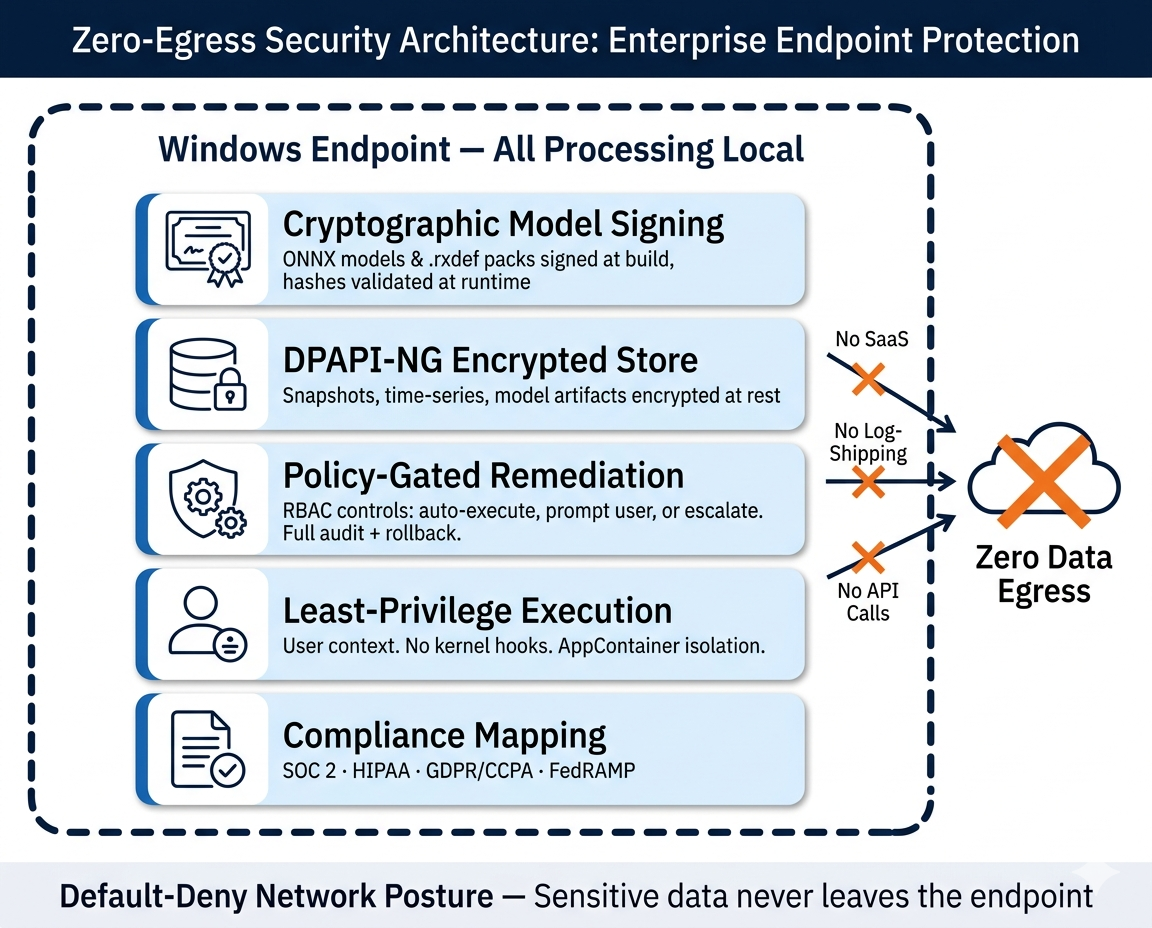
Sensitive data never leaves the endpoint—even when the VPN itself is down.

Zero data egress: All inference, training, and telemetry storage occurs on-device. No SaaS dependency. No log-shipping. No remote API calls.

Encrypted telemetry store: DPAPI-NG protects all local snapshots, time-series data, and model artifacts at rest. BitLocker integration on managed endpoints.

Cryptographic model signing: Every ONNX model file and .rxdef remediation pack is signed at build time. Agent validates hashes at runtime—blocking tampering, model poisoning, and unauthorized modifications.

Least-privilege execution: Runs in user context with minimal system service for WMI tasks. No kernel hooks. AppContainer isolation where supported.

Policy-gated remediation: Admin-defined RBAC controls which fix actions auto-execute vs. require user/IT confirmation. Every action logged with rollback and full audit trail.

Compliance mapping: SOC 2 Type II, HIPAA, GDPR/CCPA, FedRAMP-alignment documentation. Default-deny network posture. Configurable retention controls.
ReXGuardianCA zero-egress security architecture — fully local ML pipeline with DPAPI-NG encrypted telemetry, cryptographic model signing, least-privilege execution, policy-gated RBAC remediation, SOC 2 HIPAA GDPR CCPA FedRAMP compliance mapping
Hardware-Agnostic NPU/GPU Acceleration

ONNX Runtime + DirectML: cross-silicon inference across every major NPU and GPU family.
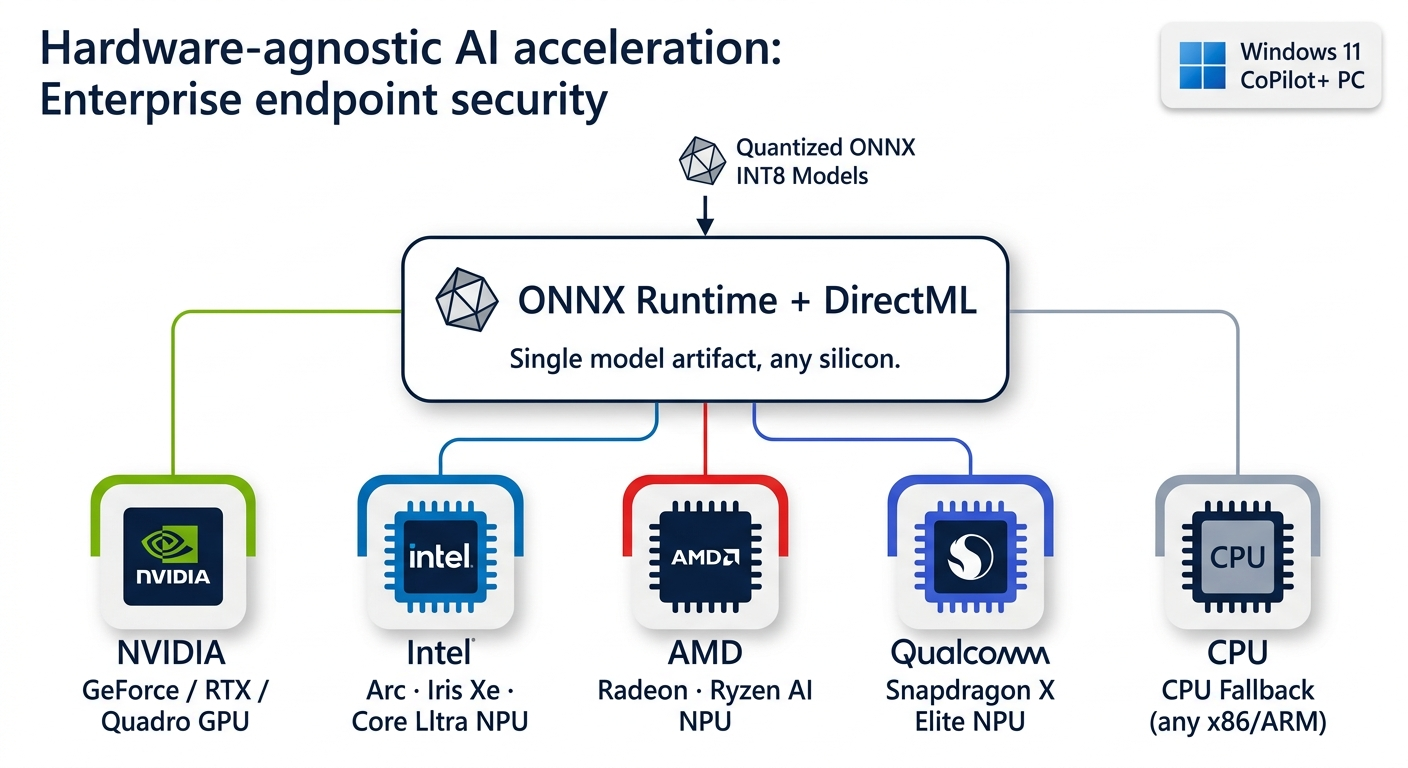
ReXGuardianCA’s ML pipeline runs on ONNX Runtime with the DirectML execution provider, enabling hardware-accelerated inference on any DirectX 12-compatible silicon. On Windows 11 CoPilot+ PCs, the agent automatically offloads model inference to the dedicated NPU for sub-second latency—no code changes, no rebuilds. All models ship as quantized ONNX (INT8) to minimize memory footprint and maximize throughput.
ReXGuardianCA hardware-agnostic AI acceleration — ONNX Runtime with DirectML distributing quantized INT8 model inference across NVIDIA GPU, Intel Arc and Core Ultra NPU, AMD Radeon and Ryzen AI NPU, Qualcomm Snapdragon X Elite NPU, and CPU fallback — single model artifact, any silicon, Windows 11 CoPilot Plus PC automatic NPU offload
NVIDIA
GeForce / RTX / Quadro
Intel
Arc · Iris Xe · Core Ultra NPU
AMD
Radeon · Ryzen AI NPU
Qualcomm
Snapdragon X Elite NPU
CPU Fallback
Any x86 / ARM64

Modern WinUI 3 UX with official Windows networking and NCSI signals

Optional OpenVINO execution provider for Intel-heavy fleets

Intune/SCCM, ServiceNow, and SIEM integrations

Same agent binary, same model artifacts—automatic acceleration on whatever silicon is present

FAQ

Does it ship data to the cloud?

No. All AI/ML inference runs locally on the endpoint via ONNX Runtime. Zero data egress by design. Policies control what’s stored locally and for how long—no log-shipping, no remote API calls, even when the VPN is down.

Will it conflict with our VPN/ZTNA client?

ReXGuardianCA is vendor-agnostic and uses only documented Windows/Microsoft APIs—no kernel hooks, no driver-level interception. Remediation actions are policy-gated; every fix executes through the same controlled interface with rollback and audit.

Can we trust automated fixes?

Deploy in monitor-only mode first. Enable auto-remediation per playbook as confidence grows. The Decision Engine fuses ML confidence scores with admin-defined policy thresholds—only high-confidence, pre-approved actions execute automatically. Every action is logged with full rollback.

How does it integrate with ServiceNow?

Only when escalation is needed, the ReXGuardian AI Agent posts human-readable diagnostics into the ticket and attaches evidence. No standing integration required—escalation is event-driven and policy-controlled.

What NPU/GPU hardware is supported?

All DirectX 12-compatible silicon: NVIDIA, Intel, AMD, and Qualcomm NPUs/GPUs. On Windows 11 CoPilot+ PCs, inference automatically offloads to the dedicated NPU—no rebuilds, no configuration. Runs great on CPU-only endpoints today.

Deployment & footprint?

Lightweight agent built on .NET 8 and WinUI 3. Intune/SCCM ready (silent install, policy controls). No kernel hooks; security-first architecture. Resource-constrained watchdog timers prevent excessive CPU/memory use.

How are ML models and remediation packs updated?

Models and .rxdef packs are cryptographically signed and delivered through secure channels (Intune/SCCM or direct). The agent validates hashes before loading. Federated learning enables model improvement without uploading raw data—only encrypted weight diffs leave the device, if enabled by policy.

Ready to cut tickets and downtime?

See how on-device AI detects and self-heals remote connectivity issues—no SaaS, no log-shipping. Schedule a 30-minute demo tailored to your environment.